GANs Specialization from DeepLearning.ai

Back in November 2020, I finished 3 courses that were part of the Generative Adversarial Networks (GANs) Specialization created by DeepLearning.ai and taught at Coursera. It was a very informative and enjoyable course. It went through the gamut of GANs, from its history, the fundamentals, up to the State of the Art. Following is a quick synopsis of the three courses.

Course 1 – Build Basic GANs

Week 1 gives you the introduction to GANs – what is the generator and the discriminator, their history and what you can do with them.  It also introduces the BCE cost function

Week 2 introduces Deep Convolutional GANs and goes through some basics – activation functions, batch normalization, basics of convolutions, stride and padding, pooling and upsampling, and transposed convolutions

Week 3 Starts introducing improvements to the basic GANs methodology.  It talks about problems with using BCE Loss like model collapse and vanishing gradients and how it can be overcome by using Wasserstein Loss and 1-L Continuity

Week 4 is about conditional and controllable generation.  Conditional is about what is generated and controllable is about making tweaks around what is generated.

Course 2 – Build Better GANs

Week 1 talks about evaluating GANs, why it’s difficult and using features instead of pixels for comparison.  It talks about the feature extractor and introduces Frechet Inception Distances (FID) and an earlier but flawed metric called the Inception Score.  Later it introduces sampling and a truncation trick to refine your GANs for fidelity or diversity and also talks about precision and recall as it relates to GANs.

Screen Shot 2021-08-01 at 5.40.46 AM

Week 2 deals with GANs disadvantages and machine bias.  One disadvantage is evaluation – there isn’t a metric that’s grounded in theory. Evaluation is done mainly via comparisons between generated and real images.  It’s also not invertible – you can derive the noise vector from the image, and finally there’s no density estimation, which is good for anomaly detection.

Alternatives to GANs are presented, including variable autoencoders, flow models, and hybrid architectures

Machine Bias is also introduced in this week, illustrated by the COMPAS program, a commercial algorithm used by courts for pre-trial sentencing.  Bias also entails discussions of fairness and what constitutes a good fairness metric, examples being demographic parity and equality of odds.

Screen Shot 2021-08-13 at 5.23.48 PM

Finally, the week wraps up with a discussion around how biases can be introduced either through the training set or the code architecture.

Week 3 delves into improvements in GANs and introduces us to StyleGANs – the state of the art of GANs capabilities as of this writing.  It features better fidelity, diversity, and feature control ( think mixing features from two images to produce a new one or adding glasses to faces ).  The main components of StyleGANs is

  1. Progressive growing – introduced by ProGANs, a predecessor of StyleGANs, it starts creating the image initially via low resolution images and progressively grows the image while also being evaluated by the discriminator.
  2. The noise mapping network, which takes the initial noise vector and produces and intermediate noise vector to be fed into StyleGANs, and
  3. The adaptive instance normalization (AdaIN) which takes the intermediate noise vector and treats them before injecting them into various layers of the StyleGANs.  Earlier layers change general features and later layers modify finer features.

Screen Shot 2021-08-15 at 10.09.19 AM

Course 3 – Apply GANs

Week 1 Data Augmentation and Data Privacy.  GANs can be used to augment data sets when real world data cannot be attained.  Although there are other techniques for data augmentation ( like taking a photo and flipping/rotating/zooming it ), GANs gives you more variation and also adds realism.  

GANs can also be used for privacy and anonymity.  For privacy, it can be used to anonymize MRI or CT scans that are used for training a model.  One case re: anonymity is hiding the true identity of someone who would be unwilling to testify.  One obvious con is the rise of deepfakes and its ability to manipulate video to make it look like someone was there was. he/she wasn’t

Week 2 deals with Image to Image translation with Pix2Pix.  I2I is used to transfer styles, transform an image to an abstraction ( i.e. segment map ), colorizing video

Screen Shot 2021-08-24 at 12.50.01 AM

Pix2Pix is a kind of paired conditional generation model.  It’s pretty complicated model and the course delves into its various components – PatchGAN, U-Net, and the Pixel Distance Loss Term.

Week 3 introduces unpaired image translation and the CycleGAN.  Whereas paired I2I has pairs of images that correspond to each other, there is no such thing for unpaired I2I – instead you have to piles of images and the GAN tries to learn differences between one pile and the other.  This is the famous zebras to horses translation.

Screen Shot 2021-08-24 at 1.01.41 AM

Downloading code

The programming labs were in jupyter notebooks provided by the course, but you could download the code and run it on your own system, which I did and will show you how below.

In the Coursera notebook, do File->Open

This will show you the home directory.  If there are files to download, you can do it here.  In certain cases, the file may be too big, or you have a directory with too many files to download.  In that case, you’ll have to tar and split the files.

Archive and splitting files

We archive directories to put everything into one file and split them if the resultant archive is too large to download ( because of browser limitations ). 

You can do command line commands in the coursera notebook via the bang (!)

!tar cvfz <your_file>.tar.gz <directory or file>

To split the file, do this and use -b to determine the split sixe.  The following splits files according to 50 mb

!split -b 50m <your tar file> <split file format>

!split -b 50m example.tar.gz example.tar.gz.part

This will give you split files example.tar.gz.part[a-z]

At this point, you can go to the directory in your coursera notebook select each file and individually download them.

The put it back together, just cat the files

cat example.tar.gz.part* > example.tar.gz

CUDA out of memory

I encountered this while running Course 3 Week 2 assignments A and B.  It may not be related to the code.

Several fixes can be found in https://stackoverflow.com/questions/54374935/how-to-fix-this-strange-error-runtimeerror-cuda-error-out-of-memory

The one that seemed to work was removing the nvidia cache

rm -fr ~/.nv

Summary

Overall, taking the course was a great experience.  The fact that you can download most of the code means you can continue to learn and explore long after the course is over.  Like most deeplearning.ai courses, the lectures cover a wide range of subjects and the labs give you plenty of leeway to explore the implementations.  Until recently, the slack channels for the various courses were available to look up questions you didn’t ask before, but they recently archived those channels and moved to a different server.

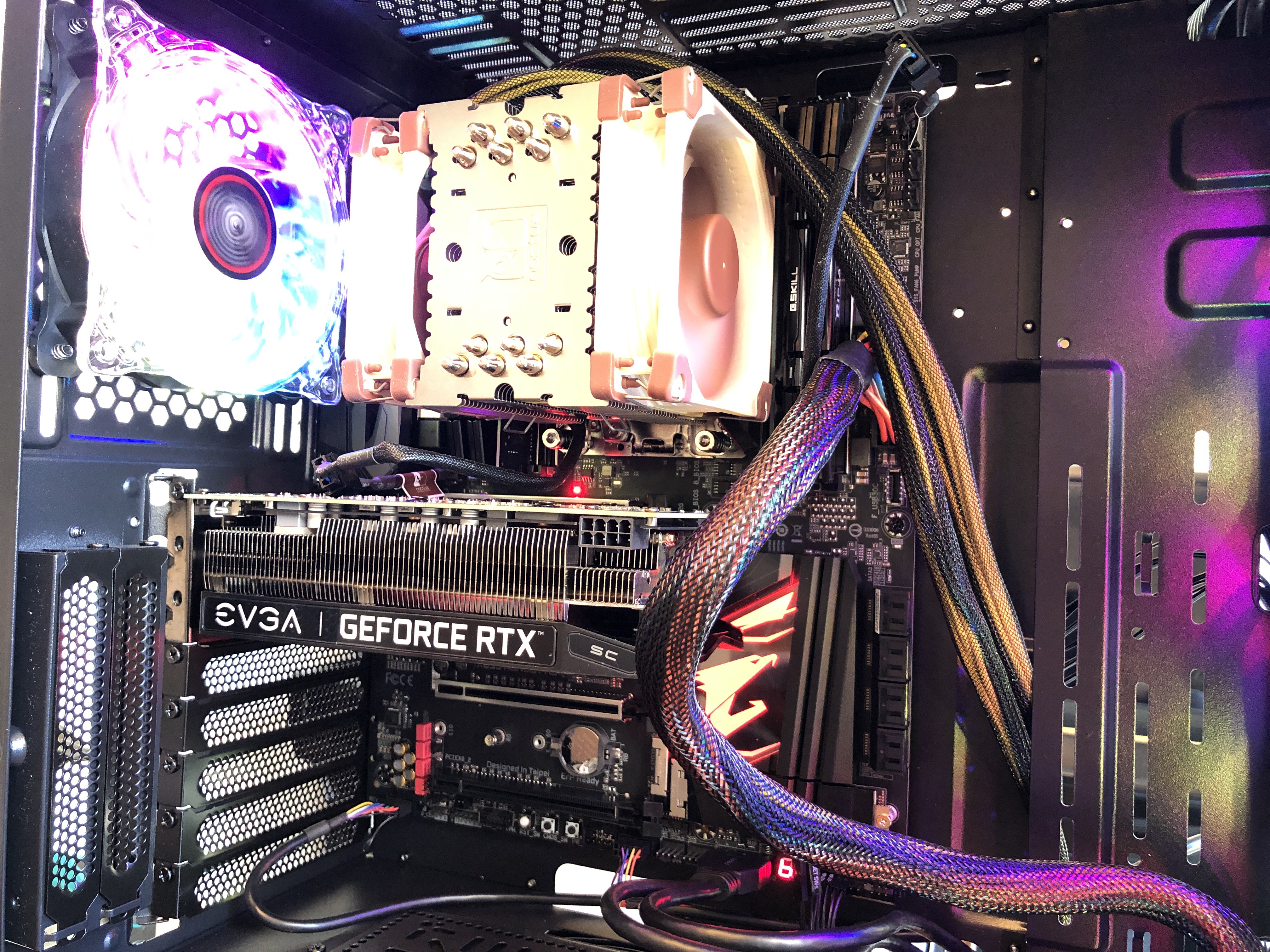
AMD deep learning desktop build

Work notes while building an AMD based desktop for deep learning projects with Ubuntu 18.04, CUDA, with TF and Pytorch

Monday Feb 17th ( President’s Day ) started at 10:30a

  • added the CPU
  • Add memory
    • Ripjaws memory won’t fit under the Noctua fan, so have to rip open the covers 14B517F1-D581-4741-81F4-2F491F646708
  • add M.2
  • Screw motherboard to case
  • Add graphics card
  • Hook up power
  • Hook up connections
  • Power on test

    • Power supply just went on standby.  After about 20 minutes of debugging, turns out the on off connections weren’t secure.

  • Hooked up HD
  • Power on
  • image

Finished 3:17p ( including lunch )

Saturday Feb 22nd (9:09pm)

Finished around midnight

Final notes

  • 500GB of Samsung 1TB formatted ext4 – /dev/nvme0n1p5
  • Dual boot into Ubuntu first
  • Formatted 8GB microSD card to hold Ubuntu bootable disk and installation
  • Installs
    • Nvidia driver – 430
    • CUDA 10.1
    • Anaconda
    • Python 3.7
    • TF 2.0.1 – conda activate tfgpu
    • Pytorch – conda activate pytorch

References

  • Ubuntu install
  • Conda  install tensorflow-gpu – this will also install CUDA.
    • The following NEW packages will be INSTALLED:

      _libgcc_mutex: 0.1-main
      _tflow_select: 2.1.0-gpu
      absl-py: 0.9.0-py37_0
      asn1crypto: 1.3.0-py37_0
      astor: 0.8.0-py37_0
      blas: 1.0-mkl
      blinker: 1.4-py37_0
      c-ares: 1.15.0-h7b6447c_1001
      ca-certificates: 2020.1.1-0
      cachetools: 3.1.1-py_0
      certifi: 2019.11.28-py37_0
      cffi: 1.14.0-py37h2e261b9_0
      chardet: 3.0.4-py37_1003
      click: 7.0-py_0
      cryptography: 2.8-py37h1ba5d50_0
      cudatoolkit: 10.1.243-h6bb024c_0
      cudnn: 7.6.5-cuda10.1_0
      cupti: 10.1.168-0
      gast: 0.2.2-py37_0
      google-auth: 1.11.2-py_0
      google-auth-oauthlib: 0.4.1-py_2
      google-pasta: 0.1.8-py_0
      grpcio: 1.27.2-py37hf8bcb03_0
      h5py: 2.10.0-py37h7918eee_0
      hdf5: 1.10.4-hb1b8bf9_0
      idna: 2.8-py37_0
      intel-openmp: 2020.0-166
      keras-applications: 1.0.8-py_0
      keras-preprocessing: 1.1.0-py_1
      ld_impl_linux-64: 2.33.1-h53a641e_7
      libedit: 3.1.20181209-hc058e9b_0
      libffi: 3.2.1-hd88cf55_4
      libgcc-ng: 9.1.0-hdf63c60_0
      libgfortran-ng: 7.3.0-hdf63c60_0
      libprotobuf: 3.11.4-hd408876_0
      libstdcxx-ng: 9.1.0-hdf63c60_0
      markdown: 3.1.1-py37_0
      mkl: 2020.0-166
      mkl-service: 2.3.0-py37he904b0f_0
      mkl_fft: 1.0.15-py37ha843d7b_0
      mkl_random: 1.1.0-py37hd6b4f25_0
      ncurses: 6.1-he6710b0_1
      numpy: 1.18.1-py37h4f9e942_0
      numpy-base: 1.18.1-py37hde5b4d6_1
      oauthlib: 3.1.0-py_0
      openssl: 1.1.1d-h7b6447c_4
      opt_einsum: 3.1.0-py_0
      pip: 20.0.2-py37_1
      protobuf: 3.11.4-py37he6710b0_0
      pyasn1: 0.4.8-py_0
      pyasn1-modules: 0.2.7-py_0
      pycparser: 2.19-py_0
      pyjwt: 1.7.1-py37_0
      pyopenssl: 19.1.0-py37_0
      pysocks: 1.7.1-py37_0
      python: 3.7.6-h0371630_2
      readline: 7.0-h7b6447c_5
      requests: 2.22.0-py37_1
      requests-oauthlib: 1.3.0-py_0
      rsa: 4.0-py_0
      scipy: 1.4.1-py37h0b6359f_0
      setuptools: 45.2.0-py37_0
      six: 1.14.0-py37_0
      sqlite: 3.31.1-h7b6447c_0
      tensorboard: 2.1.0-py3_0
      tensorflow: 2.1.0-gpu_py37h7a4bb67_0
      tensorflow-base: 2.1.0-gpu_py37h6c5654b_0
      tensorflow-estimator: 2.1.0-pyhd54b08b_0
      tensorflow-gpu: 2.1.0-h0d30ee6_0
      termcolor: 1.1.0-py37_1
      tk: 8.6.8-hbc83047_0
      urllib3: 1.25.8-py37_0
      werkzeug: 1.0.0-py_0
      wheel: 0.34.2-py37_0
      wrapt: 1.11.2-py37h7b6447c_0
      xz: 5.2.4-h14c3975_4
      zlib: 1.2.11-h7b6447c_3

  • Test Tensorflow and python3 install
    • (tf-gpu) dan@dan-X399-AORUS-PRO:~/dev/tensorflow-cnn-tutorial$ python3
      Python 3.7.6 (default, Jan 8 2020, 19:59:22)
      [GCC 7.3.0] :: Anaconda, Inc. on linux
      Type “help”, “copyright”, “credits” or “license” for more information.
      >>> import tensorflow as tf
      >>> tf.__version__
      ‘2.1.0’
      >>> tf.test.is_gpu_available()
      WARNING:tensorflow:From <stdin>:1: is_gpu_available (from tensorflow.python.framework.test_util) is deprecated and will be removed in a future version.
      Instructions for updating:
      Use `tf.config.list_physical_devices(‘GPU’)` instead.
      2020-02-23 01:48:20.149384: I tensorflow/core/platform/cpu_feature_guard.cc:142] Your CPU supports instructions that this TensorFlow binary was not compiled to use: SSE4.1 SSE4.2 AVX AVX2 FMA
      2020-02-23 01:48:20.175975: I tensorflow/core/platform/profile_utils/cpu_utils.cc:94] CPU Frequency: 3493005000 Hz
      2020-02-23 01:48:20.176961: I tensorflow/compiler/xla/service/service.cc:168] XLA service 0x55cc220e6780 initialized for platform Host (this does not guarantee that XLA will be used). Devices:
      2020-02-23 01:48:20.176985: I tensorflow/compiler/xla/service/service.cc:176] StreamExecutor device (0): Host, Default Version
      2020-02-23 01:48:20.178028: I tensorflow/stream_executor/platform/default/dso_loader.cc:44] Successfully opened dynamic library libcuda.so.1
      2020-02-23 01:48:20.351783: I tensorflow/core/common_runtime/gpu/gpu_device.cc:1555] Found device 0 with properties:
      pciBusID: 0000:41:00.0 name: GeForce RTX 2060 computeCapability: 7.5
      coreClock: 1.71GHz coreCount: 30 deviceMemorySize: 5.79GiB deviceMemoryBandwidth: 312.97GiB/s
      2020-02-23 01:48:20.352047: I tensorflow/stream_executor/platform/default/dso_loader.cc:44] Successfully opened dynamic library libcudart.so.10.1
      2020-02-23 01:48:20.353750: I tensorflow/stream_executor/platform/default/dso_loader.cc:44] Successfully opened dynamic library libcublas.so.10
      2020-02-23 01:48:20.355686: I tensorflow/stream_executor/platform/default/dso_loader.cc:44] Successfully opened dynamic library libcufft.so.10
      2020-02-23 01:48:20.355959: I tensorflow/stream_executor/platform/default/dso_loader.cc:44] Successfully opened dynamic library libcurand.so.10
      2020-02-23 01:48:20.357749: I tensorflow/stream_executor/platform/default/dso_loader.cc:44] Successfully opened dynamic library libcusolver.so.10
      2020-02-23 01:48:20.358979: I tensorflow/stream_executor/platform/default/dso_loader.cc:44] Successfully opened dynamic library libcusparse.so.10
      2020-02-23 01:48:20.363192: I tensorflow/stream_executor/platform/default/dso_loader.cc:44] Successfully opened dynamic library libcudnn.so.7
      2020-02-23 01:48:20.364707: I tensorflow/core/common_runtime/gpu/gpu_device.cc:1697] Adding visible gpu devices: 0
      2020-02-23 01:48:20.364766: I tensorflow/stream_executor/platform/default/dso_loader.cc:44] Successfully opened dynamic library libcudart.so.10.1
      2020-02-23 01:48:20.665490: I tensorflow/core/common_runtime/gpu/gpu_device.cc:1096] Device interconnect StreamExecutor with strength 1 edge matrix:
      2020-02-23 01:48:20.665531: I tensorflow/core/common_runtime/gpu/gpu_device.cc:1102] 0
      2020-02-23 01:48:20.665540: I tensorflow/core/common_runtime/gpu/gpu_device.cc:1115] 0: N
      2020-02-23 01:48:20.667506: I tensorflow/core/common_runtime/gpu/gpu_device.cc:1241] Created TensorFlow device (/device:GPU:0 with 5220 MB memory) -> physical GPU (device: 0, name: GeForce RTX 2060, pci bus id: 0000:41:00.0, compute capability: 7.5)
      2020-02-23 01:48:20.669697: I tensorflow/compiler/xla/service/service.cc:168] XLA service 0x55cc24b5ece0 initialized for platform CUDA (this does not guarantee that XLA will be used). Devices:
      2020-02-23 01:48:20.669713: I tensorflow/compiler/xla/service/service.cc:176] StreamExecutor device (0): GeForce RTX 2060, Compute Capability 7.5
      True
      >>>

  • Run MNIST test using this tutorial https://github.com/dragen1860/TensorFlow-2.x-Tutorials
    • The Cole Murray tutorial used previously wasn’t compatible with TF 2.1 used here https://github.com/ColeMurray/tensorflow-cnn-tutorial
    • (tf-gpu) dan@dan-X399-AORUS-PRO:~/dev/TensorFlow-2.x-Tutorials/03-Play-with-MNIST$ python3 main.py
      Downloading data from https://storage.googleapis.com/tensorflow/tf-keras-datasets/mnist.npz
      11493376/11490434 [==============================] – 1s 0us/step
      datasets: (60000, 28, 28) (60000,) 0 255
      2020-02-23 01:52:33.707955: I tensorflow/stream_executor/platform/default/dso_loader.cc:44] Successfully opened dynamic library libcuda.so.1
      2020-02-23 01:52:33.720688: I tensorflow/core/common_runtime/gpu/gpu_device.cc:1555] Found device 0 with properties:
      pciBusID: 0000:41:00.0 name: GeForce RTX 2060 computeCapability: 7.5
      coreClock: 1.71GHz coreCount: 30 deviceMemorySize: 5.79GiB deviceMemoryBandwidth: 312.97GiB/s
      2020-02-23 01:52:33.720807: I tensorflow/stream_executor/platform/default/dso_loader.cc:44] Successfully opened dynamic library libcudart.so.10.1
      2020-02-23 01:52:33.721751: I tensorflow/stream_executor/platform/default/dso_loader.cc:44] Successfully opened dynamic library libcublas.so.10
      2020-02-23 01:52:33.722790: I tensorflow/stream_executor/platform/default/dso_loader.cc:44] Successfully opened dynamic library libcufft.so.10
      2020-02-23 01:52:33.722949: I tensorflow/stream_executor/platform/default/dso_loader.cc:44] Successfully opened dynamic library libcurand.so.10
      2020-02-23 01:52:33.723951: I tensorflow/stream_executor/platform/default/dso_loader.cc:44] Successfully opened dynamic library libcusolver.so.10
      2020-02-23 01:52:33.724572: I tensorflow/stream_executor/platform/default/dso_loader.cc:44] Successfully opened dynamic library libcusparse.so.10
      2020-02-23 01:52:33.726953: I tensorflow/stream_executor/platform/default/dso_loader.cc:44] Successfully opened dynamic library libcudnn.so.7
      2020-02-23 01:52:33.727906: I tensorflow/core/common_runtime/gpu/gpu_device.cc:1697] Adding visible gpu devices: 0
      2020-02-23 01:52:33.728194: I tensorflow/core/platform/cpu_feature_guard.cc:142] Your CPU supports instructions that this TensorFlow binary was not compiled to use: SSE4.1 SSE4.2 AVX AVX2 FMA
      2020-02-23 01:52:33.751744: I tensorflow/core/platform/profile_utils/cpu_utils.cc:94] CPU Frequency: 3493005000 Hz
      2020-02-23 01:52:33.752694: I tensorflow/compiler/xla/service/service.cc:168] XLA service 0x5620d9fcbb40 initialized for platform Host (this does not guarantee that XLA will be used). Devices:
      2020-02-23 01:52:33.752717: I tensorflow/compiler/xla/service/service.cc:176] StreamExecutor device (0): Host, Default Version
      2020-02-23 01:52:33.753560: I tensorflow/core/common_runtime/gpu/gpu_device.cc:1555] Found device 0 with properties:
      pciBusID: 0000:41:00.0 name: GeForce RTX 2060 computeCapability: 7.5
      coreClock: 1.71GHz coreCount: 30 deviceMemorySize: 5.79GiB deviceMemoryBandwidth: 312.97GiB/s
      2020-02-23 01:52:33.753608: I tensorflow/stream_executor/platform/default/dso_loader.cc:44] Successfully opened dynamic library libcudart.so.10.1
      2020-02-23 01:52:33.753625: I tensorflow/stream_executor/platform/default/dso_loader.cc:44] Successfully opened dynamic library libcublas.so.10
      2020-02-23 01:52:33.753639: I tensorflow/stream_executor/platform/default/dso_loader.cc:44] Successfully opened dynamic library libcufft.so.10
      2020-02-23 01:52:33.753654: I tensorflow/stream_executor/platform/default/dso_loader.cc:44] Successfully opened dynamic library libcurand.so.10
      2020-02-23 01:52:33.753668: I tensorflow/stream_executor/platform/default/dso_loader.cc:44] Successfully opened dynamic library libcusolver.so.10
      2020-02-23 01:52:33.753682: I tensorflow/stream_executor/platform/default/dso_loader.cc:44] Successfully opened dynamic library libcusparse.so.10
      2020-02-23 01:52:33.753697: I tensorflow/stream_executor/platform/default/dso_loader.cc:44] Successfully opened dynamic library libcudnn.so.7
      2020-02-23 01:52:33.755060: I tensorflow/core/common_runtime/gpu/gpu_device.cc:1697] Adding visible gpu devices: 0
      2020-02-23 01:52:33.755099: I tensorflow/stream_executor/platform/default/dso_loader.cc:44] Successfully opened dynamic library libcudart.so.10.1
      2020-02-23 01:52:33.834700: I tensorflow/core/common_runtime/gpu/gpu_device.cc:1096] Device interconnect StreamExecutor with strength 1 edge matrix:
      2020-02-23 01:52:33.834733: I tensorflow/core/common_runtime/gpu/gpu_device.cc:1102] 0
      2020-02-23 01:52:33.834740: I tensorflow/core/common_runtime/gpu/gpu_device.cc:1115] 0: N
      2020-02-23 01:52:33.836021: I tensorflow/core/common_runtime/gpu/gpu_device.cc:1241] Created TensorFlow device (/job:localhost/replica:0/task:0/device:GPU:0 with 5113 MB memory) -> physical GPU (device: 0, name: GeForce RTX 2060, pci bus id: 0000:41:00.0, compute capability: 7.5)
      2020-02-23 01:52:33.837739: I tensorflow/compiler/xla/service/service.cc:168] XLA service 0x5620dd752280 initialized for platform CUDA (this does not guarantee that XLA will be used). Devices:
      2020-02-23 01:52:33.837752: I tensorflow/compiler/xla/service/service.cc:176] StreamExecutor device (0): GeForce RTX 2060, Compute Capability 7.5
      Model: “sequential”
      _________________________________________________________________
      Layer (type) Output Shape Param #
      =================================================================
      dense (Dense) multiple 200960
      _________________________________________________________________
      dense_1 (Dense) multiple 65792
      _________________________________________________________________
      dense_2 (Dense) multiple 65792
      _________________________________________________________________
      dense_3 (Dense) multiple 2570
      =================================================================
      Total params: 335,114
      Trainable params: 335,114
      Non-trainable params: 0
      _________________________________________________________________
      2020-02-23 01:52:34.579333: I tensorflow/stream_executor/platform/default/dso_loader.cc:44] Successfully opened dynamic library libcublas.so.10
      0 loss: 1.2610700130462646 acc: 0.15625
      200 loss: 0.43644407391548157 acc: 0.6821875
      400 loss: 0.35265296697616577 acc: 0.8464062
      600 loss: 0.30810198187828064 acc: 0.870625
      800 loss: 0.2214876413345337 acc: 0.90234375
      1000 loss: 0.29607510566711426 acc: 0.89453125
      1200 loss: 0.2684360444545746 acc: 0.9134375